SAP PI/PO to SAP Integration Suite: a practical migration readiness checklist
Before moving SAP Process Integration or Process Orchestration (PI/PO) interfaces to SAP Integration Suite, answer four questions: which connections are still needed, what must change, who will accept the result and how will the business recover if the switch fails?
A purchase order reaching a supplier, a warehouse confirming a dispatch and a bank acknowledging a payment are different business outcomes. Each needs a migration plan that accounts for timing, dependencies and failure handling.
If you are new to the target platform, read our SAP CPI explainer. Cloud Integration, often still called CPI, is the Integration Suite capability discussed in that introduction. This guide focuses on preparing an existing PI/PO landscape for migration.
Why plan the migration now?
SAP's published maintenance strategy provides mainstream maintenance for SAP PI/PO release 7.5 through the end of 2027, with an option for extended maintenance through the end of 2030. These dates apply to release 7.5; verify your installed release and applicable maintenance arrangements with SAP. An end-of-maintenance date does not mean the software automatically stops running. Source: SAP NetWeaver maintenance strategy.
The planning implication is straightforward: leave room for discovery, remediation, business testing and transition support. Converting an interface is only one part of the work. Application owners, external partners and operations teams also need time to prepare.
Use the following seven checks to establish whether your programme is ready to move from discussion to a credible delivery plan.
1. Build an inventory that explains business impact
Start with the deployed integration landscape, then reconcile it with runtime activity and conversations with application owners. A configuration export alone cannot tell you whether an interface remains business-critical.
For each interface, record:
- The business process, source system, destination and accountable owner.
- Protocols, adapters, mappings and custom processing.
- Message volumes, peak periods, payload sizes and timing requirements.
- Authentication, certificates, network dependencies and external contacts.
- Failure handling, replay procedures and upstream or downstream dependencies.
- Evidence of recent use, including seasonal or infrequent activity.
An interface with no traffic during a short observation window may still support year-end processing. Confirm retirement with its business owner before removing it from scope.
Readiness output: an agreed inventory with an owner and a business purpose for every interface in scope.
2. Decide what to retire, migrate, replace or redesign
Review each interface's future purpose alongside its technical complexity. Use these four planning decisions:
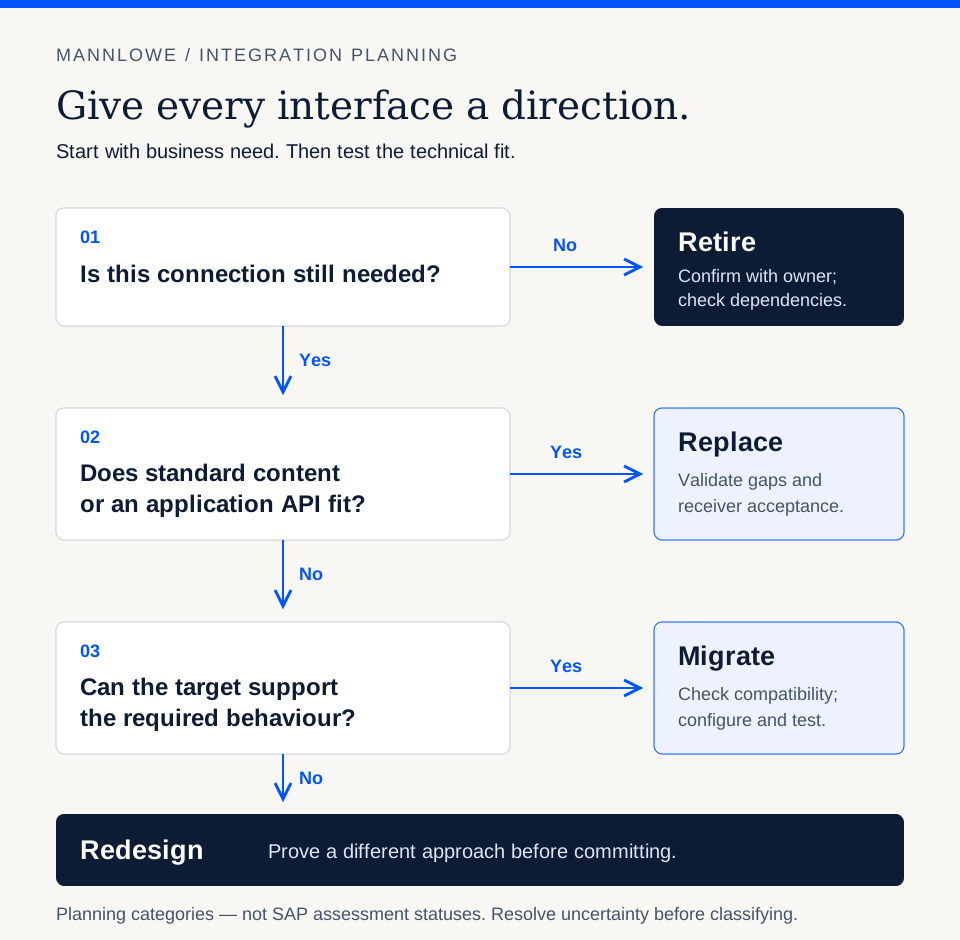
Open full-size diagram (new tab)
| Decision | When it fits | Evidence to capture |
|---|---|---|
| Retire | The business process or connection is no longer needed | Owner confirmation and dependency review |
| Migrate | The current behaviour is still required and has a suitable target implementation | Mapping, adapter and processing compatibility |
| Replace | Standard content or an application API may meet the requirement | Fit-gap assessment and receiving-system acceptance |
| Redesign | The current implementation depends on behaviour that needs a different approach | Target design, unresolved assumptions and a technical proof |
Review custom adapter modules, Java code, complex mappings and orchestration explicitly. Record where behaviour is implemented today and how the target design will reproduce or intentionally change it.
Coordinate this decision with any S/4HANA migration programme. An interface being rebuilt for a new ERP process may need a different sequence from one whose endpoints will remain unchanged.
Readiness output: a disposition and target approach for every interface, with unresolved design questions visible.
3. Use SAP's assessment and migration tools with clear expectations
SAP's Migration Assessment helps evaluate migration feasibility and estimate technical effort. Migration Tooling in Cloud Integration supports pattern-based migration of integration objects; its availability depends on your Integration Suite service plan. Check your plan, source-system version and supported patterns before estimating automated conversion. Sources: SAP's assessment lesson, SAP migration tooling, supported patterns.
One documented limitation matters particularly for planning: Migration Assessment does not detect dependencies between interfaces or analyse the business processes that connect them. SAP also describes its configuration analysis as object-based rather than scenario-based. Supplement the report with manual dependency analysis. Source: known limitations of Migration Assessment.
Budget a separate review for custom adapters and adapter modules, whose internal logic the assessment does not inspect. BPM and ccBPM process logic also require manual analysis. An object appearing in the inventory does not establish that its implementation has been assessed. Source: assessment scope and limitations.
Use a representative pilot to check the effort remaining after conversion: configuration, connectivity, custom logic, tests and operational preparation. A generated iFlow is a starting point for validation.
Readiness output: assessment findings linked to the inventory, plus pilot evidence supporting the estimate.
4. Prepare connectivity, security and operations before migration waves
Agree how development, testing and production will be separated, how changes will move between them and who can deploy or administer integrations. Confirm the target services and commercial entitlements with the people responsible for your SAP environment.
For every connection, review network access, authentication, certificate ownership and credential rotation. Check whether a partner must change an endpoint or allowlist a new address, and put that dependency into the schedule.
Define operational behaviour early: alert recipients, diagnostic access, message retention, replay permissions and escalation routes. Where messages contain sensitive business or personal data, decide what can be logged and who may inspect it.
Readiness output: a working target environment with verified connectivity and named operational owners.
5. Test complete business outcomes and failure recovery
A successful middleware status is useful evidence, but acceptance should also confirm the expected result in the receiving application.
Build a test pack covering:
- Normal transactions and representative production data variations.
- Invalid or incomplete input, rejected messages and mapping exceptions.
- Receiver outages, timeouts and recovery after an interruption.
- Duplicate delivery, retry behaviour and message ordering where required.
- Peak traffic, large payloads and agreed processing windows.
- Reconciliation between what the sender submitted and what the receiver accepted.
For each test, specify the expected application outcome and the person authorised to accept it. Include the teams that investigate failures after go-live.
Illustrative manufacturing example: an ERP sends a delivery request to a warehouse system, which later returns a dispatch confirmation. A useful pilot follows that full round trip. It checks what happens if the warehouse accepts a request but its acknowledgement is delayed, whether a retry creates a duplicate instruction, and whether the final confirmation updates the correct delivery. This is a planning example, not a Mannlowe client result.
Readiness output: agreed acceptance criteria and evidence for both normal processing and recovery.
6. Plan migration waves around dependencies and reversibility
Choose an initial wave that is manageable and representative. Include enough complexity to validate the delivery approach without making the first cutover depend on every business-critical interface.
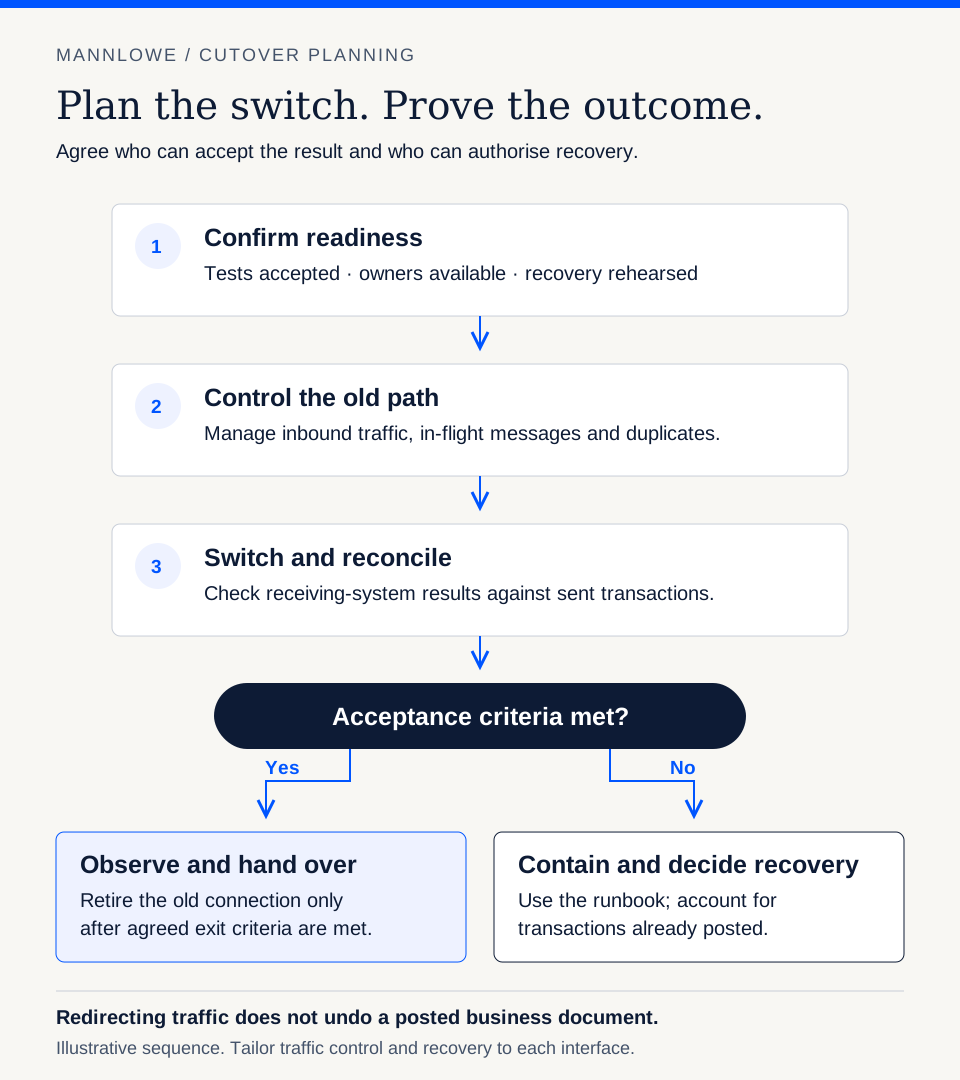
Group subsequent waves around connected processes and application readiness. Before each switch, document:
- Who stops or redirects inbound traffic and when.
- How in-flight messages and outstanding acknowledgements are handled.
- How duplicate processing across the old and new paths is prevented.
- Which checks determine success and when the team makes that decision.
- What triggers rollback and who authorises it.
- How transactions already posted in receiving systems will be reconciled.
Rollback may involve more than restoring an endpoint. If the receiver has already created a business document, changing traffic back does not undo that transaction. Rehearse recovery against the actual business process.
Open full-size diagram (new tab)
Readiness output: a cutover and recovery runbook that has been reviewed by technical and business owners.
7. Define handover and retirement criteria
Agree the support model before the migration team leaves. Operations should know how to identify a failed process, locate its messages, decide whether replay is safe and escalate an application-side problem.
Maintain a support record for each migrated interface: owner, expected schedule, alerts, dependencies, recovery steps and relevant business identifiers. Base the handover on demonstrated support readiness.
Retire the old interface after business acceptance, reconciliation and the agreed observation period. Review shared PI/PO dependencies before planning platform decommissioning; one migrated interface does not establish that the whole system is ready to switch off.
Readiness output: accepted support ownership and explicit criteria for retiring each old connection.
What should an assessment deliver before you approve the programme?
A useful assessment should leave you with an agreed interface inventory, migration decisions, target architecture, dependency map, test approach and phased delivery estimate. It should also identify assumptions that could change the budget or schedule.
Ask for estimates to separate discovery, platform preparation, interface work, testing, cutover and transition support. An interface count alone does not explain delivery effort. A small number of highly dependent interfaces may need more preparation than a larger group of straightforward connections.
Discuss your integration landscape with Mannlowe
Mannlowe's system integration services connect SAP and ERPNext with business applications and external platforms. If you are planning a PI/PO transition, contact our team to discuss your current interfaces, target systems and delivery constraints.
Bring an initial interface list, your PI/PO version, critical processing windows and any connected S/4HANA programme milestones. These provide a practical starting point for scoping the work.